
When choosing between XLR and USB microphones, avoid assuming one is always better; it depends on your needs. XLR mics offer professional sound but require extra gear, making them pricier and more complex to set up. USB mics are easier and more portable, ideal for casual use. To get the most suitable option, consider your budget, setup skills, and future plans. Keep these points in mind, and you’ll make smarter choices as you explore further.
Key Takeaways
- Don’t choose a microphone based solely on cost; consider your audio quality needs and future expansion plans.
- Avoid assuming USB microphones are always sufficient; high-quality recordings may require an XLR setup.
- Remember that XLR microphones need additional equipment, increasing complexity and initial setup time.
- Opt for USB if convenience and portability are priorities; choose XLR for professional, scalable audio solutions.
- Be aware that upgrading from a USB to XLR system involves more investment and technical setup.

When choosing a microphone, understanding the differences between XLR and USB options is essential, especially since each offers distinct advantages depending on your needs. Your decision impacts both the audio quality you get and the connectivity options available, so it’s worth considering these factors carefully.
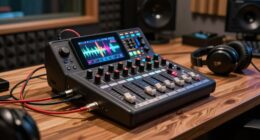
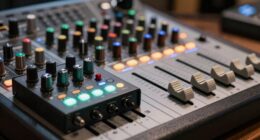
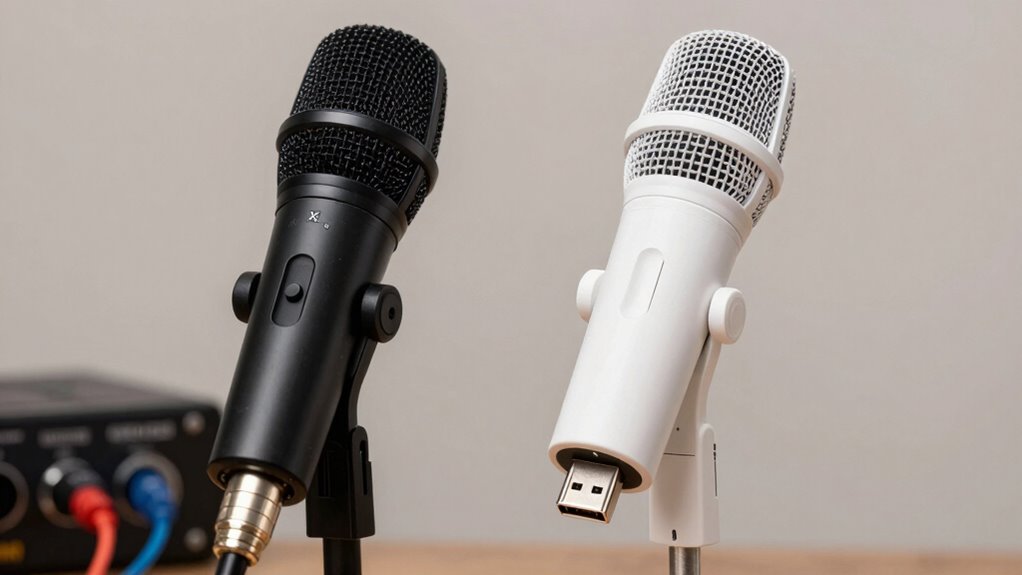
XLR microphones are known for their superior audio quality, making them a popular choice for professionals and serious hobbyists. They’re designed to deliver a clean, clear sound with less noise and better dynamic range. This is particularly important if you’re recording music, podcasts, or streaming high-quality content. The trade-off is that XLR mics require additional equipment—namely, an audio interface or mixer—to connect to your computer. These devices convert analog signals into digital, ensuring you get the best sound possible. While this setup might seem more complex initially, it offers greater flexibility and scalability, especially if you plan to expand your audio setup later on. Understanding audio interfaces can help you make an informed decision about how to best set up your equipment.
On the other hand, USB microphones provide a straightforward, plug-and-play experience. They connect directly to your computer via USB port, eliminating the need for extra gear. This makes USB mics incredibly convenient for beginners, podcasters, or anyone seeking quick setup without sacrificing much in audio quality. Advances in technology have allowed many USB microphones to produce sound quality that’s more than sufficient for casual streaming, video conferencing, and content creation. The connectivity options are simple—just plug it in, select it as your input device, and you’re ready to go. This simplicity is especially appealing if you don’t want to deal with multiple cables or devices.
However, it’s important to recognize that the audio quality of USB microphones, while improving, generally isn’t quite on par with high-end XLR models. If you’re aiming for professional-grade sound, the added investment in an XLR setup can be worthwhile. Additionally, considering technology can help you make an informed decision based on your specific needs. If you’re aiming for the best possible audio quality and are comfortable with a bit more setup, an XLR microphone paired with an audio interface is the way to go. But if you prefer a simple, portable solution that works right out of the box, a USB microphone might be the smarter choice for you. Understanding these core differences helps you avoid the common mistake of choosing a mic based solely on price or brand, without considering how it will fit into your workflow.
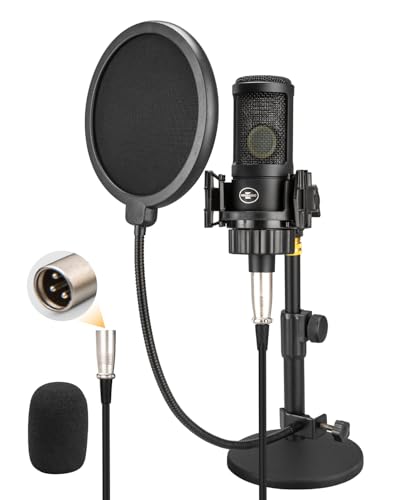
XLR Condenser Microphone with 26mm Large Diaphragm, Professional Cardioid Recording Studio Mic Kit with Metal Desktop Stand, Pop Filter for Streaming, Podcasting, Gaming, Voice-Over, Vocal, Youtube
26MM Large Diaphragm Gold Condenser Capsule : The XLR condenser microphone features a custom-designed 26mm large diaphragm condenser…
As an affiliate, we earn on qualifying purchases.
As an affiliate, we earn on qualifying purchases.
Frequently Asked Questions
Can I Upgrade From USB to XLR Later?
Yes, you can upgrade from a USB to an XLR microphone later, but keep in mind the microphone cost and sound quality differences. Upgrading might involve buying a new microphone and an audio interface, which could be an added expense. If you prioritize better sound quality and flexibility for future setups, investing in an XLR mic now makes sense. Just make certain your current equipment can support the upgrade when you’re ready.
Which Microphone Type Offers Better Durability?
You’ll find that XLR microphones generally offer better durability due to higher-quality materials and construction, making them more resistant to wear and tear over time. Durability factors like sturdy construction, weather resistance, and robust connectors contribute to longer microphone longevity. In contrast, USB microphones, while convenient, often have simpler builds that may not withstand heavy use as well. If durability is your priority, an XLR microphone is usually the smarter choice.
Are XLR Microphones More Portable Than USB?
XLR microphones are generally less portable than USB microphones because of their larger size and the need for additional equipment like audio interfaces or mixers, which can complicate portability. If you prioritize a portable design and easy setup, USB microphones are a better choice. Their compact size makes them easier to carry around, making them ideal for on-the-go recording or streaming. Consider your size and convenience needs before choosing.
Do XLR Mics Require Special Software?
Imagine you’re recording a podcast, and you notice your XLR microphone needs special software for ideal audio quality. Yes, XLR mics often require audio interfaces or mixing consoles, which come with necessary microphone accessories like preamps and gain controls. These setups help improve sound clarity but mean you need to install specific drivers or software. So, while they offer superior audio quality, they do demand extra steps for setup and operation.
How Do I Determine Compatibility With My Devices?
To determine compatibility, check your device’s digital connectivity options like USB ports or XLR inputs. For USB microphones, verify your device supports USB audio, and for XLR mics, confirm it has an audio interface or mixer. Also, consider power requirements—USB mics draw power from your device, while XLR mics need an external power source or phantom power. Always review your device’s specifications before buying.

FIFINE USB/XLR Dynamic Microphone for Podcast Recording, PC Computer Gaming Streaming Mic with RGB Light, Mute Button, Headphones Jack, Desktop Stand, Vocal Mic for Singing YouTube-AmpliGame AM8
[Natural Audio Clarity] Operated with frequency response of 50Hz-16KHz, the podcasting XLR mic delivers balanced audio range, likely…
As an affiliate, we earn on qualifying purchases.
As an affiliate, we earn on qualifying purchases.
Conclusion
Choosing between an XLR and a USB microphone might seem tricky, but it’s all about your needs. If you want top-tier sound quality and flexibility, an XLR is a game-changer that’ll elevate your recordings to legendary status. For simplicity and quick setup, a USB mic is your best friend. Remember, making the right choice isn’t just smart—it’s the difference between speaking into a microphone and commanding an audio empire. Choose wisely, and let your voice shine!

Focusrite Scarlett Solo 3rd Gen USB Audio Interface for Guitarists, Vocalists, Podcasters or Producers to record and playback studio quality sound
Pro performance with great pre-amps – Achieve a brighter recording thanks to the high performing mic pre-amps of…
As an affiliate, we earn on qualifying purchases.
As an affiliate, we earn on qualifying purchases.

ZealSound Podcast Microphone for PC, Noise Cancellation USB Mic with Gain, Volume Adjustment & Mute Button, Monitoring & Echo, for YouTube, TikTok, Podcasting, Streaming, iPhone, iPad, Android, Mac
Studio-Quality Sound for Clear Podcast Recording – The K66 USB podcast microphone delivers studio-quality, broadcast-level audio using a…
As an affiliate, we earn on qualifying purchases.
As an affiliate, we earn on qualifying purchases.